A Multi-Page submission is to be used when the limitations of the claim form do not allow all services to be entered on a single form.
CMS1500
The CMS 1500 claim allows only six service lines per page. The result of this is such that any time there are 7 or more services to be submitted, it must be submitted as a Multi-Page claim.
The following guidelines will describe how to submit a multiple-page claim:
- Determine how many claim forms will be required to bill for all services rendered to the member on the date of service. For example 12 services will require 2 claim forms, 13 services will require 3 claim forms.
- Label the claim forms in the top right corner of the form (see example below). For example, if two forms will be needed, label the first page "Page 1 of 2" and label the second page "Page 2 of 2."
- Only the service lines (Form Locator 24A-24J) and the total charge (Form Locator 28) may be different from page to page. Be sure to enter the HMSA member ID number and other vital information correctly and consistently on each page.
- Diagnosis pointers in Form Locator 24E across for all pages point back to the diagnosis codes on the first page only.
- If charging for tax, do not list a tax charge on each page. The tax charge should be listed as the last item on the last page.
- Do not list a total charge on each page. On multiple-page claims, the total charge for all items should be listed on the last page only. On previous pages, type the word "continued" in Form Locator 28 (see example below).
- Staple all pages together at the center top of the page.
- Multi-Page CMS 1500 claims may not exceed 50 service lines.
Example - Top of first page

Example - Service from first page

Example - Top of second page

Example - Service from second page

UB04 (CMS 1450)
The UB04 claim allows only 22 service lines per page. This means that any time there are 23 or more services to be submitted a Multi-Page submission must be done.
The following guidelines will describe how to submit a multi-page claim:
- Determine how many claim forms will be required to bill for all services rendered to the member on the date of service. For example 40 services will require 2 claim forms, 60 services will require 3 claim forms.
- Label the claim forms in the appropriate place in the center of the form (see example below). For example, if two forms will be needed, label the first page "Page 1 of 2" and label the second page "Page 2 of 2."
- Only the service lines (Form Locator 42-48) and the total charge may be different from page to page. Be sure to enter the HMSA member ID number and other vital information correctly and consistently on each page.
- Do not list a total charge on each page. On multiple-page claims, the total charge for all items on all pages should be listed on the last page only. On previous pages, type the word "continued" in total charge field (see example below).
- Staple all pages and any associated attachments together at the center top of the page.
- Multi-Page UB04 claims may not exceed 999 service lines.
Example - Service from first page
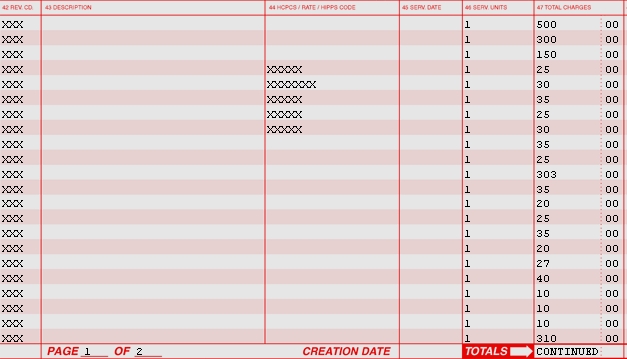
Example - Service from second page

CA: September 2011